Meta Prompting Your Workflow

I've been using Claude Code a lot lately and I noticed that I had a desire to analyze my past prompts - or simply recall what I had written and how I had written it.
This is the story behind that and how I've found it useful.
I was desiring to make a command, but I wanted to first understand what my prompts were and how they would behave as a command. I knew that scanning across conversation history from different git worktrees and projects might show me the different variations I was using.
It began with a simple prompt:
inspect ~/.claude for my conversation history using ripgrep. I'm specifically
interested in my prompts and would like to create a global command for
/what-did-i-say that searches for past prompts using ripgrep to extract
matching prompts, none of the conversation around them, then attempts to
summarize the various variations while pointing out how Claude would
interpret them differently
Claude analyzed 11,831 prompts from my conversation history. It spit out some analysis of my most common prompts and the slight variations of it. I then in turn continued until I had refined the /what-did-i-say enough that I knew its scanning and analysis would behave how I wanted it to.
~/.claude/commands/what-did-i-say.md
# What Did I Say?

Analyze your past prompts from Claude conversation history to identify patterns, variations, and potential interpretation differences.

## Instructions

Extract and analyze user prompts from `~/.claude/history.jsonl` to understand how you phrase requests and how Claude might interpret them differently.

### Step 1: Extract Recent Prompts

Use ripgrep to extract prompts from the history file. The prompts are stored in the `.display` field of each JSONL entry.

```bash
# Get last 100 prompts (excluding empty ones)
cat ~/.claude/history.jsonl | jq -r '.display' | rg -v '^$' | tail -n 100 > /tmp/recent_prompts.txt

# Or search for specific patterns
cat ~/.claude/history.jsonl | jq -r '.display' | rg -i '' | tail -n 50 > /tmp/matching_prompts.txt
```

### Step 2: Categorize Prompts

Group prompts by type:

- **Slash commands**: Start with `/` (e.g., `/test`, `/mcp`, `/validate`)
- **Direct requests**: Imperative statements ("Add X", "Fix Y", "Create Z")
- **Questions**: Start with question words or end with `?`
- **Context-setting**: Explaining what you want to do ("I'd like to...", "I want to...")
- **Refinements**: Follow-up prompts modifying previous requests ("Actually...", "Instead...")
- **Short vs detailed**: Brief commands vs. detailed explanations

Use ripgrep to categorize:

```bash
cd ~/.claude
# Slash commands
cat history.jsonl | jq -r '.display' | rg '^\/' | sort | uniq -c | sort -rn

# Questions
cat history.jsonl | jq -r '.display' | rg -i '(^(what|how|why|when|where|which|can|should|is|does|do)\s|\?$)' | tail -n 50

# Context-setting phrases
cat history.jsonl | jq -r '.display' | rg -i "^(I'd like to|I want to|I need to|Let's|Please)" | tail -n 50

# Direct imperatives
cat history.jsonl | jq -r '.display' | rg -i "^(add|create|fix|update|remove|delete|implement|refactor|analyze|inspect|open|close)" | tail -n 50
```

### Step 3: Identify Variations

Find similar prompts with different phrasing:

```bash
# Testing-related prompts
cat ~/.claude/history.jsonl | jq -r '.display' | rg -i '(test|testing|spec)' | sort | uniq

# Build/validation prompts
cat ~/.claude/history.jsonl | jq -r '.display' | rg -i '(build|compile|lint|validate)' | sort | uniq

# File/code reading prompts
cat ~/.claude/history.jsonl | jq -r '.display' | rg -i '(read|show|examine|inspect|look at|check)' | sort | uniq
```

### Step 4: Analyze Interpretation Differences

For each category of prompts, explain how Claude would interpret them differently:

#### Ambiguity Analysis
- **Vague vs. Specific**: "fix the bug" vs. "fix the null pointer exception in UserController.java:42"
- **Scope Clarity**: "update tests" vs. "update the unit tests in the auth module to use the new mock framework"
- **Implicit vs. Explicit**: "make it better" vs. "refactor this function to reduce cyclomatic complexity below 10"

#### Command Style Impact
- **Slash commands**: Interpreted as invoking predefined skills/hooks
- **Questions**: Trigger explanatory/informational responses, less likely to take action
- **Imperatives**: Clear action signals, Claude proceeds with implementation
- **Context-setting**: May trigger plan mode or clarifying questions

#### Conciseness Trade-offs
- **Brief**: Faster, but may miss nuance or context
- **Detailed**: Clearer intent, but may include unnecessary constraints
- **Just right**: Action + target + relevant constraints

### Step 5: Generate Summary Report

Create a report showing:

1. **Most Common Prompt Patterns** (with counts)
2. **Ambiguous Prompts** - Cases where clarification would help
3. **Effective Prompts** - Clear, actionable examples
4. **Variation Analysis** - Similar requests phrased differently and their interpretation impact
5. **Recommendations** - How to improve prompt clarity based on patterns

Example output format:

```markdown
## Prompt Analysis Summary

### Most Frequent Commands
- `/test` (145 times) - Run tests
- `/validate` (89 times) - Lint and build
- `/mcp` (67 times) - MCP server management

### Common Patterns

#### Testing Requests (3 variations)
1. "/test" → Runs all tests immediately
2. "run the tests" → Same action, but conversational style
3. "can you test this?" → Question form, Claude may ask which tests

**Interpretation:** Slash command is most direct and unambiguous.

#### File Inspection (5 variations)
1. "read CLAUDE.md" → Opens file immediately
2. "show me CLAUDE.md" → Same action, casual tone
3. "what's in CLAUDE.md?" → May summarize instead of showing full content
4. "inspect CLAUDE.md" → Same as read, technical tone
5. "look at CLAUDE.md" → Same as read, casual tone

**Interpretation:** All trigger file reading, but questions may yield summaries vs. full content.

### Recommendations
- Use slash commands for standard operations (faster, clearer)
- Be specific with file paths and function names
- Use imperatives for action, questions for information
- Provide context for ambiguous terms ("the button" → "the submit button in LoginForm.tsx")
```

## Usage Notes

- History contains ALL prompts from all projects and sessions
- Use `jq` filters to narrow by project or date if needed: `jq 'select(.project == "auto-mobile")'`
- The analysis should focus on YOUR prompting patterns, not general advice
- Highlight where similar intents had different phrasings and potential impact

## Optional Parameters

If the user provides a search term, focus the analysis on prompts matching that pattern:

```bash
# Analyze only Android-related prompts
cat ~/.claude/history.jsonl | jq -r 'select(.display | test("(?i)(android|adb|emulator)")) | .display'
```

If the user specifies a count (e.g., "last 50 prompts"), limit the analysis accordingly.
Each invocation searches local conversation history, identifies variations in phrasing, explains how Claude interprets each differently and potential impact.
And then to test it out:
/what-did-i-say about interfaces, fakes, and FakeTimerKey findings from the analysis:
| My Phrasing | Claude's Interpretation |
|---|---|
| "are we using fakes appropriately?" | Review and report findings |
| "make sure we're using fakes" | Verify and fix if needed |
| "use fakes" | Just do it immediately |
This subtle difference in phrasing creates completely different outcomes.
Creating /create-command
Then I went recursive. If analyzing prompts revealed patterns, why not automate the process of creating new commands from patterns?
Prompt:
now lets make /create-command using what we've learned about creating commands to make it easy to use this meta prompting approach to search prompt history, analyze it, elicit whether the user wants it to be a project or global command, and then creates it
So now I have something to search prompt history specifically for creating commands and then generates it along with prompting me if it should be a global or local command.
Using /create-command
Taking a step back, if you remember at the very beginning I noticed I was spending a bunch of time iterating the same workflow. Specifically it was just clicking the same buttons and tediously linking PRs to issues even though the branch contained the issue number. I didn't want a GitHub action for this because I don't want to have to set this up for every GitHub repo I work with.
/create-command /push command that instructs how to use git and gh cli
to commit local changes, push, create a pr if one not already open,
set automerge enabled if this was a new pr, link pr to issue we were
working on if not already
The neat thing is that if you'd rather have the command use the input text args as the commit message and then prompt you through writing a thorough PR description that's also possible. I did modify it to look at the input text args for suggestions about how to write the commit or whether I don't want this push to be auto-merged. I would like to see a way to use the elicit capabilities that MCP clients are implementing to generate a series of deterministic prompts, but Claude and most others haven't implemented this yet. Codex has so might give that a shot.
Creating /create-skill
That was great but skills is the new hotness from Claude and they work great. I've already been tinkering with a few and intend to put them together as a plugin, but it sure would have been easier to create with a bit more direction and examples for Claude to follow.
Make a /create-skill command to optimize for high quality skills that solve specific pain points,
  clear triggers, concrete examples, and explaining the "why". It should be in the format of
  /create-skill name-of-skill "High level description of what the skill should do"
We can see right here an example of /create-command behavior in practice:
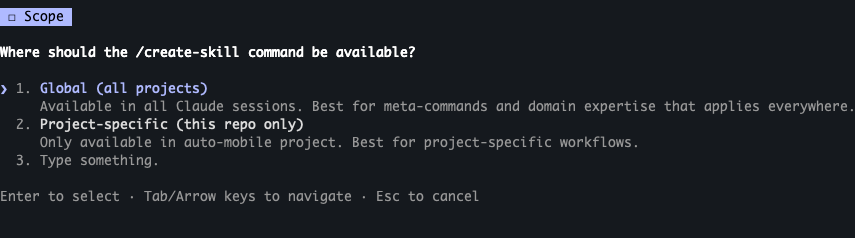
And now I have the ability to make Claude skills that are backed by research of my existing workflows and ask clarifying questions.
Meta-Meta-Note
I used /what-did-i-say a few times in writing this to check over and find specific examples of prompt history. The act of writing whether its blog posts, documentation, or PR descriptions should not be left to become soley AI-slop. AI slop cannot communicate ideas in a way that can be trusted.